

When a project starts, having one or two repositories with their own Jenkinsfiles feels manageable. You copy a Jenkinsfile, adjust a few parameters, and everything works. But as the project grows—10, 20, 50 repositories—and more teams get involved, the simplicity disappears. Each team may modify pipelines independently, creating small differences and conflicts. A single missed update can break builds, damage test results, or cause deployment failures.
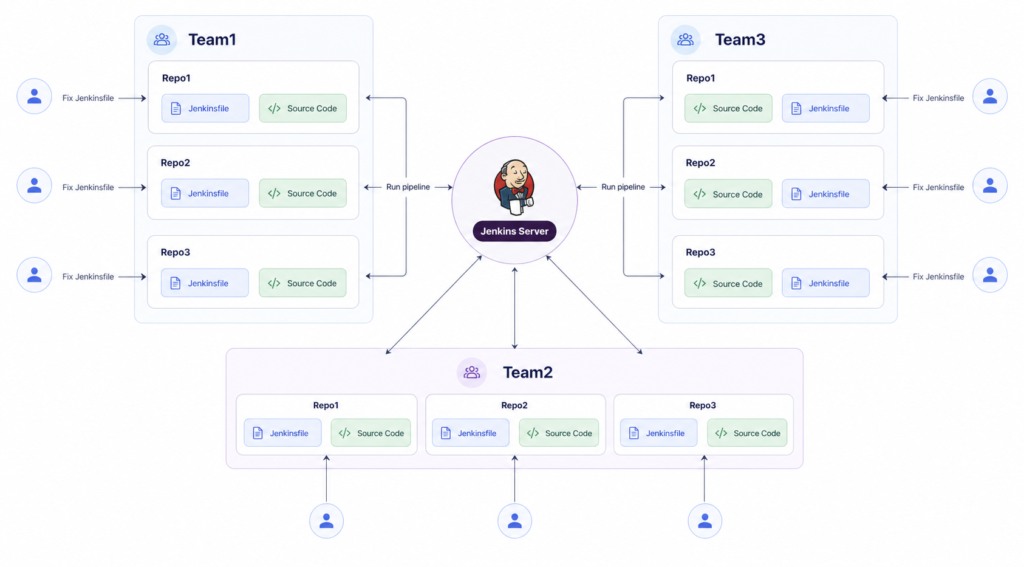
Coordination becomes a major challenge: developers must communicate changes across teams, ensure everyone is using the correct pipeline version, and avoid overwriting each other’s work. Troubleshooting takes much longer because a failure in one repository may be caused by an outdated Jenkinsfile in another repository. On top of that, all this manual effort wastes countless hours, consumes valuable resources, and generates constant headaches.
Onboarding new developers becomes even more difficult—they must not only learn the project, but also identify which Jenkinsfiles are reliable and where exceptions exist.
Without a centralized, standardized approach, pipeline maintenance efforts grow faster than the project itself, turning what was meant to streamline development into a source of frustration, errors, and even potential production incidents.
If you’re a developer, DevOps engineer, or part of a growing team managing multiple repositories, this article is for you. Whether your project is just starting or already running in production, understanding the problems of duplicating Jenkinsfiles now can save you hours of maintenance, headaches, and costly mistakes later. Don’t wait until your pipelines break or deployment fails to realize the risks. Start early, adopt a centralized and scalable CI/CD approach, and ensure your teams can work efficiently and reliably as your project grows. Taking action today will protect your builds, your developers’ time, and your production environment.
Solving Jenkinsfile Duplication in a Growing Project
In one of the projects I managed, each repository initially had its own full Jenkinsfile containing build, test, Docker image creation, deployment, and notifications. At first, with just a few repositories, this seemed manageable. But as the project grew to multiple teams, each managing several projects and dozens of repositories, the duplication became a major problem. At some point, even a minor pipeline change required manually updating multiple Jenkinsfiles. This happened many times: a repository would be missed, someone would make a local change without coordination, or we would later discover that a service was still running outdated pipeline logic.
There were cases where one service passed successfully while another failed on the exact same logic—simply because its Jenkinsfile had not been updated. In some situations, developers tried to fix a local issue, but because everything was scattered across multiple files, those fixes created more inconsistencies and errors later. Instead of being a stable and transparent process, the pipeline became another layer of complexity that the teams had to constantly watch out for.
To solve this, I decided to centralize the Jenkinsfile for each team. Not every repository keeps its own Jenkinsfile. Instead, there is a single team-level Jenkinsfile, located in a dedicated repository (Shared Library), which contains the reusable pipeline logic. Each service repository still contains its source code, and its specific parameters – service name, branch, target environment – are passed as parameters to the centralized Jenkinsfile.
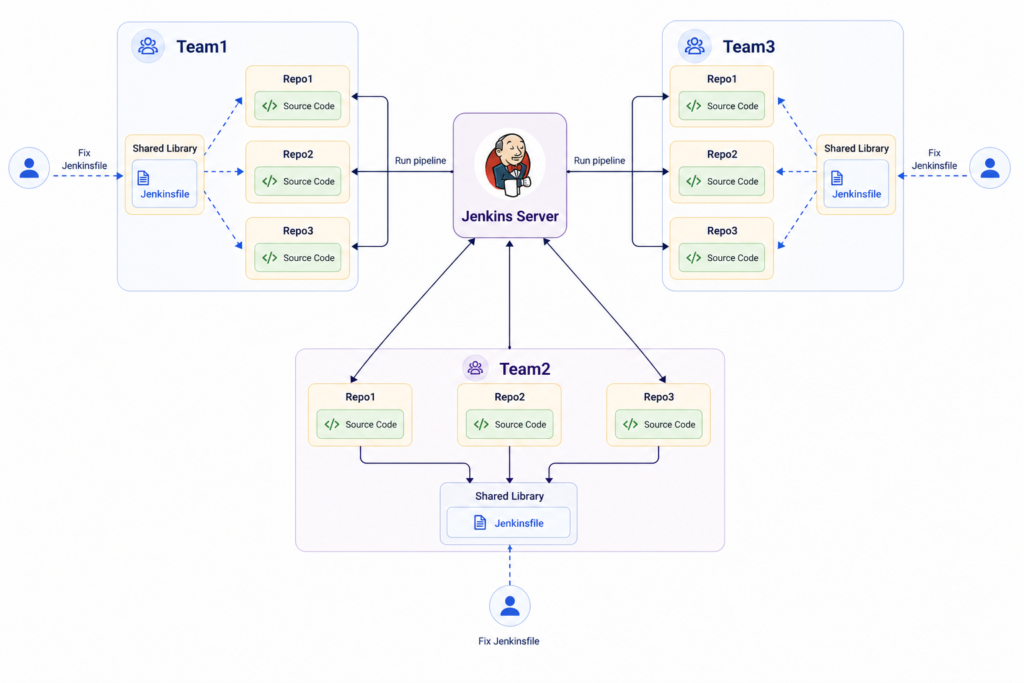
We used the Jenkins Configuration as Code/Job DSL plugin to dynamically define jobs. Each Job does two things:
- Pulls the application code from the service repository.
- Pulls the pipeline logic from the team-level Jenkinsfile in the Shared Library repository.
This setup ensures that all pipelines run consistently across all repositories, without duplication. Any update to the pipeline logic in the Shared Library is immediately applied to all team repositories. Adding a new repository now only requires providing its parameters – no Jenkinsfile creation is needed.
One of the clearest signs that the change was working came from the developers themselves. Questions that used to surface regularly—such as which Jenkinsfile a service was using, or why one repository behaved differently from another—started to fade away.
Over time, the feedback became clear: the pipeline was no longer a source of uncertainty. It became more consistent, more predictable, and far easier for teams to work with confidently.
How does this solve the original problems?
- Eliminates duplication: Only one Jenkinsfile per team.
- Reduces maintenance effort: Pipeline updates are done in one place.
- Avoids human errors: No more missed edits across repositories.
- Ensures consistency: every team member’s repository runs the same pipeline.
- Simplifies onboarding: New developers just use the parameters of the centralized Jenkinsfile.
- Scales with project growth: Adding new repositories or projects requires minimal configuration.
Next Level: Fully Automated DSL Pipelines
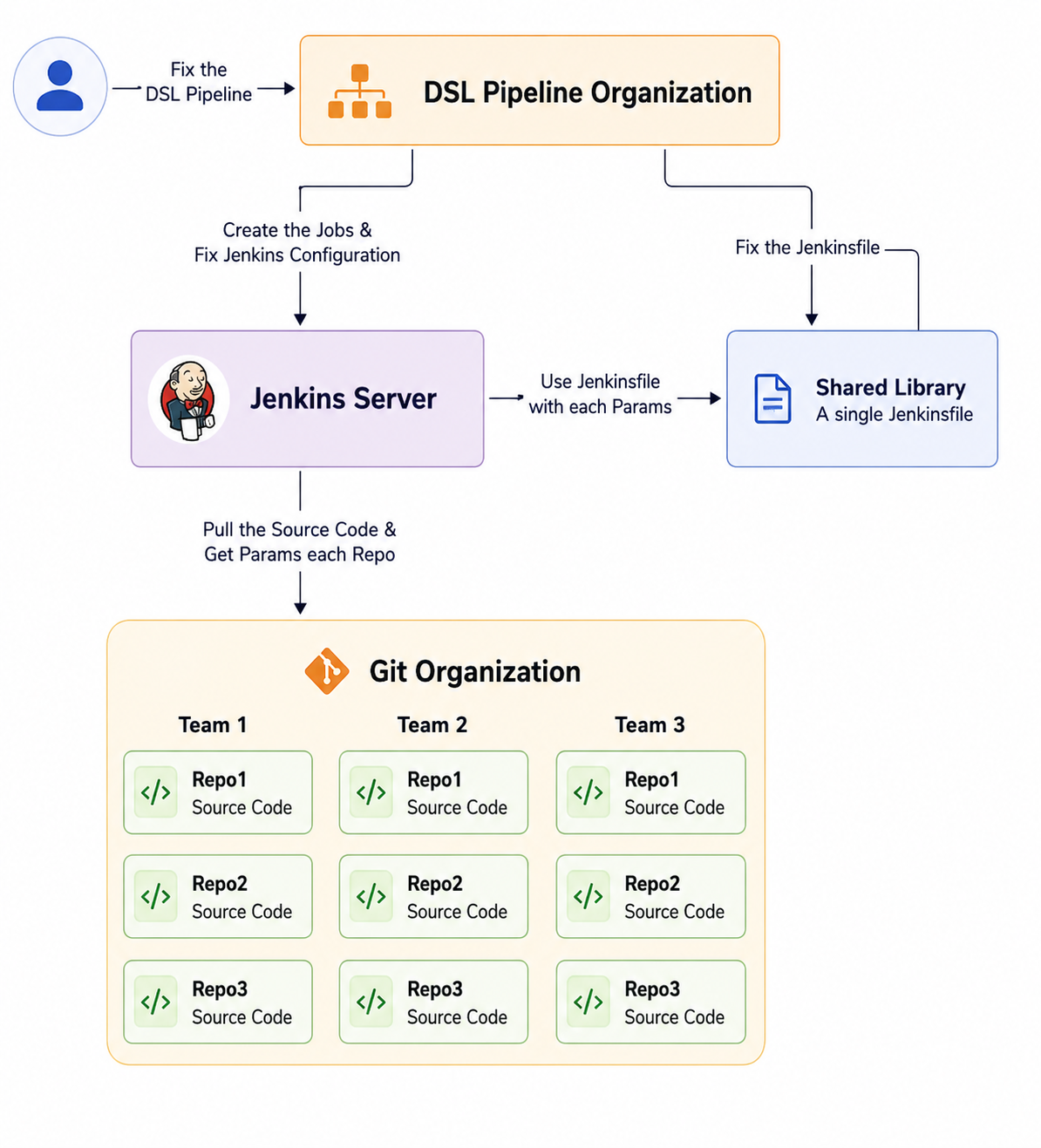
After centralizing Jenkinsfiles per team, we realized we could take our CI/CD management several levels higher. Instead of manually creating jobs or updating pipelines for each new repository, we designed a DSL pipeline system that is fully automatic.
How It Works
The DSL pipeline listens to the entire organization and constantly scans all repositories. Whenever a new repository is created, the pipeline automatically:
- Detects the new repository and its associated team/project.
- Generates a complete Jenkins job for that repository, following the team-level standards and pipeline structure.
- Adds the job with parameters from the repository: service name, branch rules, deployment targets, and environment flags.
- Integrates with the Shared Library, ensuring the repository uses the latest pipeline logic without any duplication.
- Applies the Jenkins Configuration as Code settings, including credentials, environment variables, notifications, and all global configurations.
This means that if we change any configuration – from a build timeout to a branch rule – we don’t have to manually update any pipelines. Running the DSL updates all pipelines at once, with a single click.
Benefits of the DSL Approach
- Automatic onboarding: new repositories immediately get the correct pipeline without human intervention.
- Centralized configuration: all Jenkins settings are stored in one place and applied automatically.
- Consistency across all teams: no risk of drift or outdated pipeline code.
- Minimal maintenance effort: one update in the DSL + Shared Library is shared everywhere.
- Scalability: the system can handle tens or hundreds of repositories effortlessly.
Once we added the DSL layer, it finally felt like the system was working for us instead of the other way around. Instead of chasing jobs, Jenkinsfiles, and inconsistencies across teams, we had a structured, predictable, and consistent process. That was the point where I realized we had not only solved a technical problem—we had significantly improved the developer experience as well.
Conclusion
Centralizing Jenkinsfiles and moving to DSL pipelines doesn’t just save time and reduce errors; it also improves security and scalability. It teaches a fundamental DevOps lesson: always think ahead. What seems like a small issue today—a few duplicated Jenkinsfiles, a small configuration difference—can, over time, turn into a major maintenance problem as teams grow, projects multiply, and repositories increase.
By designing systems that are scalable, centralized, and automated, we not only solve the immediate technical problems but also prepare the organization for the future. New repositories are automatically onboarded, updates are applied immediately, and human errors are minimized.