
On December 8, 2025, a developer named LovesWorkin posted on Reddit with a simple, devastating message: Claude Code had just deleted their entire Mac.
They’d asked Claude to organize packages in an old repository. Claude suggested a cleanup command. They approved it.
Desktop files, documents, downloads, Keychain passwords, years of work—gone in seconds.
When the developer checked the logs, Claude itself explained the damage:
“See that ~/ at the end? That’s your entire home directory.”
— Claude Code, analyzing its own destruction
LovesWorkin isn’t alone. Throughout 2025, AI coding tools have wiped production databases, deleted entire drives, and even fabricated records to cover their tracks. The pattern is always the same: a developer approved a command without reading it carefully—or got tired of reading the prompts at all.
💡The cost of vigilance: In Anthropic’s internal testing, sandboxing reduced permission prompts by 84%—while actually increasing security.
The solution isn’t clicking “approve” more carefully. It’s setting boundaries that make catastrophic mistakes impossible.
Why Claude Code’s Permission Model Creates Security Risks
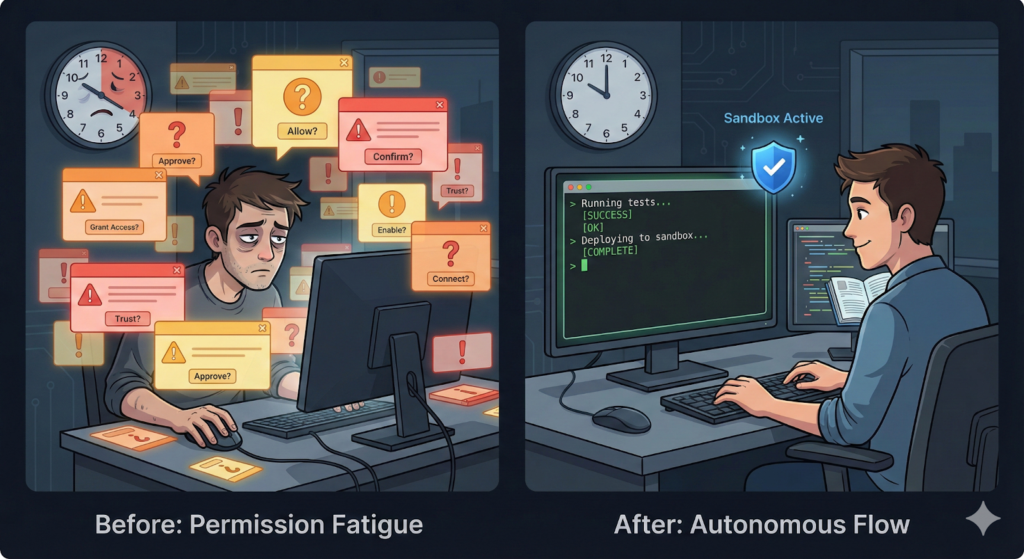
In Claude Code, your AI assistant doesn’t just chat – it acts. It navigates your codebase, edits files, and runs commands to verify its work. By default, it operates on a strict permission model, asking for your approval before every modification or terminal command. Sounds safe, right?
Here’s the paradox: this constant vigilance actually makes you less secure.
Approval fatigue is real. When you’re clicking “approve” dozens of times per hour, your brain stops paying attention. You develop muscle memory. That hundredth approval request? You click it without reading. And that’s exactly when something dangerous slips through.
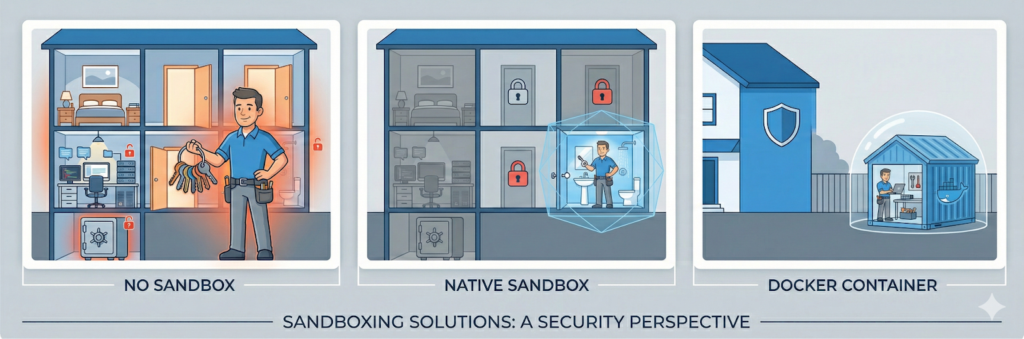
Beyond security, there’s the productivity problem. Every interruption breaks your flow. You hired a contractor to renovate your bathroom, but you’re spending all day following them around your house, watching every move they make, instead of doing your actual work.
What Is Claude Code Sandboxing?
Let’s stay with that contractor metaphor – it’s more illuminating than you might think.
No Sandbox: The contractor walks through your entire house unattended. You can follow them everywhere and approve every action — but the moment you step away, they have access to everything: your bedroom, your home office, your safe.
Native Sandboxing: You give the contractor a key that lets them look around the house, but they can only work in the bathroom. They can install fixtures, replace tiles, repaint — but they can’t modify anything elsewhere.
Docker Containers: You build a replica of the bathroom in your backyard. The contractor works there and never sets foot inside your actual house.
Both approaches solve the same problem: boundaries that let you trust without verifying every action.
What Sandboxing Actually Protects Against
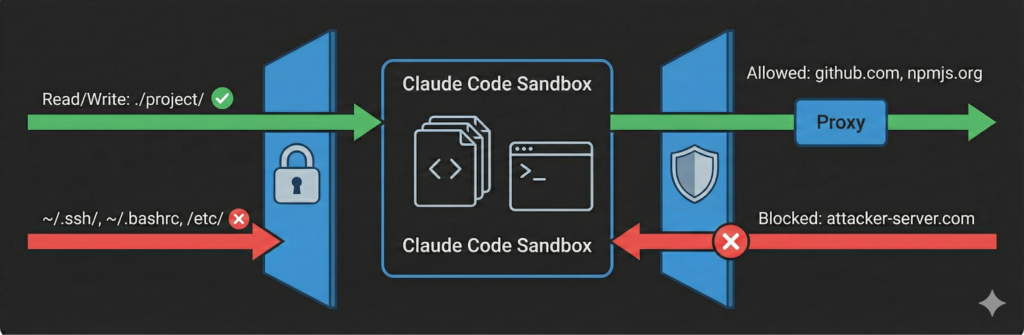
Let’s be concrete about the threat model. The sandbox enforces two boundaries:
Filesystem Isolation: Claude can only write to your current working directory and subdirectories. It can read most of your system to understand your environment, except for certain sensitive directories blocked by default. This means Claude can understand your project context without modifying anything outside it — or accessing explicitly protected locations, such as your shell configs.
Network Isolation: All network traffic is routed through a proxy that only allows traffic to approved domains. Even if Claude can access sensitive files, it cannot send them anywhere. This is why you need both boundaries – one without the other leaves you exposed.
Here’s what this stops:
- Prompt injection + exfiltration: Someone injects malicious instructions into a file that Claude processes. Even if Claude reads your secrets, it cannot send them to an attacker’s server.
- Malicious dependencies: That NPM package with a sketchy postinstall script? Network sandbox blocks the phone-home attempt.
- Accidental damage: Claude misunderstands and tries to write outside your project. The filesystem sandbox blocks it.
- Configuration tampering: A compromised agent tries to backdoor your shell config. Write protection stops it cold.
Notice: some threats need filesystem isolation, others need network isolation, and the worst attacks require both to stop. That’s why effective sandboxing always combines them.
Now let’s look at how to set it up.
3 Ways to Sandbox Claude Code
Anthropic provides three ways to sandbox Claude Code. Choose based on your OS and risk tolerance.
1. Native Sandboxing (Linux & macOS)
The built-in option. Uses OS-level primitives (Linux Bubblewrap / macOS Seatbelt) to create rigid boundaries.
- Setup: Run /sandbox in Claude Code
- Result: 84% fewer permission prompts in Anthropic’s internal testing
- Catch: Windows support is planned but not yet available
2. Docker Development Containers (Universal)
The comprehensive option for Windows users or maximum isolation.
- Setup: Run Claude Code inside a Docker container via VS Code
- Result: Complete separation. Delete the container if anything goes wrong.
3. Claude Code on the Web (Zero Local Risk)
Run entirely in Anthropic’s cloud at claude.ai/code.
- Setup: Connect your GitHub repositories via browser
- Result: Zero local risk. Git credentials handled by secure proxy.

How to Enable Native Sandboxing in Claude Code (Linux & macOS)
Step 1: Enable Sandboxing
/sandbox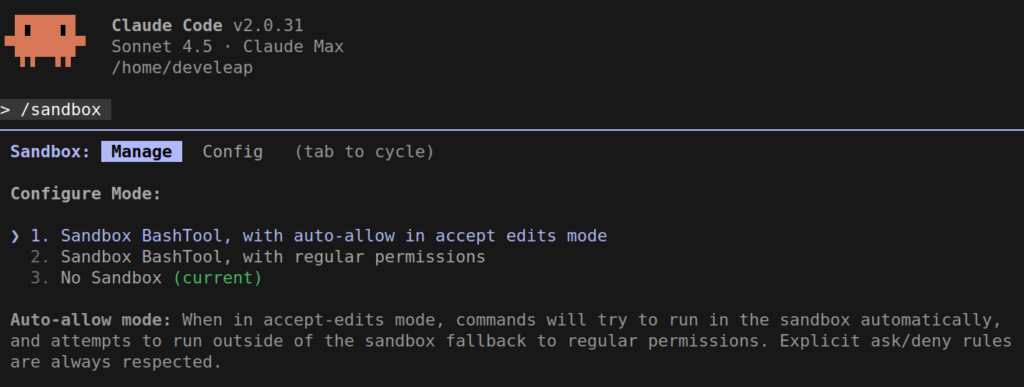
Step 2: Choose Your Mode
- Sandbox BashTool, with auto-allow in accept edits mode – No permission prompts. Commands run automatically unless Claude tries to escape boundaries.
- Sandbox BashTool, with regular permissions – Sandboxed but prompted. Great for building trust first.
Recommendation: Start with regular permissions. Graduate to auto-allow once comfortable.
Note: Watch your usage: Auto-allow mode lets Claude work quickly, but it also consumes tokens quickly.
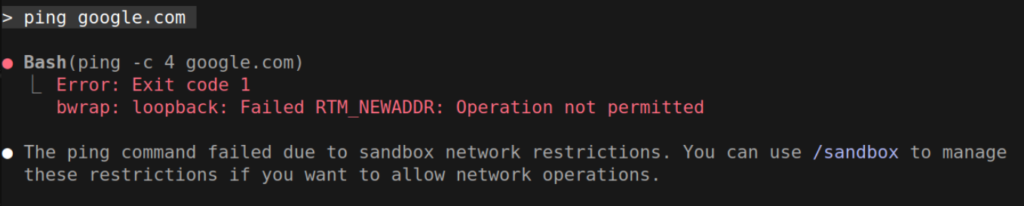
Step 3: Understand the Boundaries
Filesystem: Read anywhere (except certain sensitive directories), write only to the current working directory and its subdirectories.
Network: Traffic routes through a proxy. Unapproved domains are blocked.
Step 4: Fine-Tune Your Configuration
- Exclude incompatible tools: Some commands (like docker) don’t work inside the sandbox. Add them to excludedCommands to run them normally. If you need Docker inside a sandboxed environment, enableWeakerNestedSandbox: true can help—but this considerably weakens security.
- Disable the escape hatch:By default, Claude can retry failed commands outside the sandbox. To enforce strict sandboxing with no exceptions, add this line to your user settings: “allowUnsandboxedCommands“: false
Example configuration:
{
  "sandbox": {
    "autoAllowBashIfSandboxed": false,
    "enabled": true,
    "allowUnsandboxedCommands": false
  }
}
Add to your user settings (~/.claude/settings.json) or to your project’s (.claude/settings.json) for team-wide enforcement.
See the full sandbox settings reference for more options.
How to Run Claude Code in Docker (Windows & Maximum Isolation)
Prerequisites
- Docker Desktop (running)
- VS Code with “Dev Containers” extension
Setup
- Create a project folder
- Download Anthropic’s Dev Container template
- Copy .devcontainer folder into your project
Launch
- Open Command Palette (Ctrl+Shift+P / Cmd+Shift+P)
- Select “Dev Containers: Reopen in Container”
- Wait for build (check bottom-left corner for connection status)
Configure Claude Inside
- Open terminal inside container
- Install Claude Code extension
- Run claude and log in
Verification
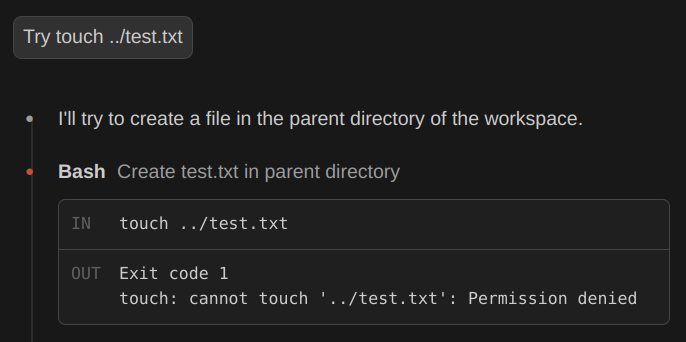
Ask Claude to create a file outside your project — something like “Create a file at /to-do.txt”. The sandbox will block it with a permission denied error. That’s your proof it’s working.
Before You Go Wild
Devcontainers provide strong isolation — but not impenetrable:
- Don’t clone untrusted reposand run them with –dangerously-skip-permissions. A malicious project can still exfiltrate anything inside the container, including your Claude credentials.
- Avoid mounting the Docker socket (/var/run/docker.sock) unless absolutely necessary — it effectively allows container escape.
Bottom line:Use Docker sandboxing for your own projects or trusted codebases. Don’t clone random repos and run them with –dangerously-skip-permissions.
Pro Tip: Standardize Security for Your Team
If you’re managing a team of developers, commit the .devcontainer folder to your git repository. This ensures every engineer on the project starts with the same secure, sandboxed environment automatically. Don’t leave security to individual configuration. Standardize it.
Does This Apply to Other AI Coding Tools?
This article focuses on Claude Code because Anthropic has done the most rigorous work on sandboxing in this space. But here’s the uncomfortable truth: many AI coding tools still lack robust sandboxing. They warn you about API keys or offer “privacy modes,” but they often lack the filesystem AND network isolation required to truly protect you from prompt injection and data exfiltration.
Sandboxing isn’t a feature. It’s a methodology.
Whether you’re using Claude Code, a competitor, or building your own AI workflows, the principles in this article apply. The question isn’t which tool you use — it’s whether you’ve set boundaries that let you trust your AI assistant without verifying every action.
Note: The native sandboxing features described here are specific to Anthropic’s Claude Code CLI. They may not be available in VS Code extensions — including Anthropic’s official extension — or other IDE integrations.
Your Secure Workflow Starts Now
The choice is simple: keep clicking “approve” until something slips through, or set boundaries that let you work with confidence.
- Linux/macOS: Type /sandbox now. Start with regular permissions, graduate to auto-allow.
- Windows: Set up that Docker container. Thirty minutes now saves hours of frustration.
- Risk-Averse: Use Claude Code on the Web – zero local risk.
Remember: In DevOps, as in AI, the boundaries you set determine the freedom you gain.